Mostrar mensagens com a etiqueta Documentos. Mostrar todas as mensagens

12 de outubro de 2013

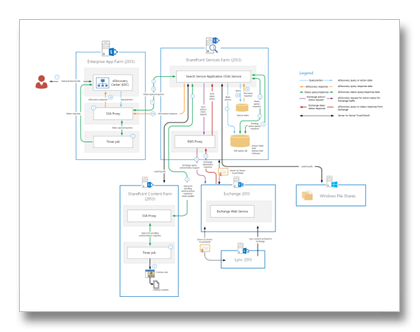
Feature Integration Across Microsoft Office Products v1.2

O documento Feature Integration Across Microsoft Office Products v1.2 foi recentemente disponibilizado para download.

image

Brief Description
Illustrations for cross-server features: This multi-tab file includes descriptions and architecture illustrations for features that work across Microsoft Office server products. (Exchange Server, Lync Server, SharePoint Server)

Overview
This multi-tab file includes descriptions and architecture illustrations for features that work across Microsoft Office server products, including server-to-server authentication, high-resolution user photos, unified contact store, site mailboxes, Exchange task synchronization, Lync presence in Outlook, and voicemail.

3 de outubro de 2013

Information Protection and Control with Microsoft Cloud Services

A Microsoft disponibilizou recentemente um conjunto de documentos técnicos sobre Information Protection and Control (IPC) in Office 365 and Exchange Online, utilizando Rights Management Services (RMS).

  • Microsoft Rights Management service (RMS) whitepapers
    The NEW Microsoft Rights Management service (RMs) offering (microsoft.com/rms) provides the capability to create and consume protected content such as e-mail and documents of any type. Such a capability is available as a standalone subscription (for your on-premises infrastructure with the Microsoft Rights Management connector) or is part of the Office 365 Enterprise subscription, natively integrated with Exchange Online, SharePoint Online, and Microsoft Office to apply persistent protection to the content to meet the business requirements of your organization.
    The Microsoft Rights Management suite is implemented as a Windows Azure service. Beyond the available RMS enlightened applications on the market, it comprises a set of Microsoft Rights Management sharing applications that work on all your common devices, a set of software development kits, and related tooling. By leveraging Windows Azure Active Directory, the cloud-hosted Microsoft Rights Management service acts as a trusted hub for secure collaboration where an organization can easily share information securely with other organizations without additional setup or configuration. The other organization(s) may be existing Microsoft Rights Management service’s customers but if not, they can use a free
    Microsoft Rights Management for individuals capability.
    The whitepapers available as part of this download covers the various aspects of the offerings and provide in-depth information to evaluate or use the Microsoft Rights Management service and its components. For an overview of the NEW Microsoft Rights Management service offerings, see the whitepaper
    NEW Microsoft Rights Management service.
  • Information Protection and Control (IPC) in Office 365 with Microsoft Rights Management service (RMS) whitepaper
    This document is intended to help you previewing and evaluating the Microsoft Rights Management service. For that purpose it contains, as an introduction, a brief information on IPC and the Microsoft Rights Management service that helps you understand what it is, and how it differs from on-premises Active Directory Rights Management Services (AD RMS). It provides step-by-step information on how to configure and use the Microsoft Rights Management service to perform rights protection on your corporate content, as well as other details and requirements you would need to successfully evaluate the Microsoft Rights Management service in your environment.
    This document is intended for system architects and IT professionals who are interested in understanding the basics of the Microsoft Rights Management service.
    This paper is part of a document series on the identity and security features of Office 365. It indeed completes an initial whitepaper on IPC entitled
    Information Protection and Control (IPC) in Microsoft Exchange Online with AD RMS also available on the Microsoft Download Center. This first paper describes the cross-premises support for AD RMS on-premises with the Exchange Online services of the previous version of Microsoft Office 365.
  • Information Protection and Control (IPC) in Microsoft Exchange Online with AD RMS whitepaper
    Built on existing Microsoft documentation and knowledge base articles, this paper presents how to leverage the corporate on-premise AD RMS infrastructure in the organization’s Office 365 tenant, and more especially with Microsoft Exchange Online.
    This document is intended for system architects and IT professionals who are interested in understanding the basics of cross-premise support for AD RMS on-premise and Exchange Online along with planning and deploying such a deployment model in their environment. It also provides basic instructions for setting up and configuring an AD RMS single-node cluster in a test lab environment for the cross-premise deployment with Exchange Online.
    This paper is part of a series of documents on the identity and security features of Office 365, and more especially is the second guide of the series. It indeed completes a first whitepaper entitled
    Microsoft Office 365 Single Sign-On (SSO) with AD FS 2.0 also available on the Microsoft Download Center. This first whitepaper of the series is intended to provide a better understanding of the different single sign-on deployment options for the services in Office 365, how to enable single sign-on using corporate Active Directory credentials and AD FS 2.0 to the services in Office 365, and the different configuration elements to be aware of for such deployment.

29 de setembro de 2013

eDiscovery Flow Across SharePoint, Exchange, Lync, and File Shares v1.2

A Microsoft fez pequenas actualizações nos diagramas que ilustram eDiscovery Flow Across SharePoint, Exchange, Lync, and File Shares.

21 de agosto de 2013

Multi-Tenant Scalability Guidance for Exchange Server 2013

A Microsoft acaba de disponibilizar o documento técnico Multi-Tenant Scalability Guidance for Exchange Server 2013.

Brief Description
This document provides scalability and deployment guidance for multi-tenant deployment based on Microsoft Exchange Server 2013.

Overview
This document contains high-level guidance for properly scaling and deploying a multi-tenant Microsoft Exchange Server 2013 solution. It includes details of testing performed in Microsoft labs to validate the scalability of the product and suggests methods that can be used during the design and deployment process to mitigate potential risks associated with such solutions.

16 de maio de 2013

Como reforçar a segurança da Active Directory ao estilo da Microsoft IT

A equipa Microsoft IT disponibilizou 2 novos documentos com algumas das melhores práticas para melhorar a segurança da Active Directory.

  • Securing Active Directory: An Overview of Best Practices - The threat of compromise to IT infrastructures from external attack is rapidly growing and evolving. The Active Directory environment is often the target for these attacks. This article details steps that your organization can take to protect its Active Directory environment
  • Best Practices for Securing Active Directory - This document contains recommendations to assist organizations in enhancing the security of their Active Directory installations. By implementing these recommendations, organizations will be able to identify and prioritize security activities, protect key segments of their organization’s computing infrastructure, and create controls that significantly decrease the likelihood of successful attacks against critical components of the IT environment. This document discusses the most common attacks against Active Directory and countermeasures to reduce the attack surface, and recommendations for recovery in the event of complete compromise.

14 de março de 2013

Exchange 2003 to Exchange 2010 AD Schema Changes Reference – Março 2013

Acaba de ser disponibilizado para download a última versão do documento Exchange Server 2003 to Exchange Server 2010 Active Directory Schema Changes Reference, March 2013.

Overview
This download includes the Exchange Server Active Directory Schema Reference, which provides information about the changes that Microsoft Exchange Server makes to the Active Directory schema when it is installed. The Exchange Server Active Directory Schema Changes Reference includes changes made by Exchange Server 2010 SP3, Exchange Server 2010 SP2, Exchange Server 2010 SP1, Exchange Server 2010, Exchange Server 2007 SP3, Exchange Server 2007 SP2, Exchange Server 2007 SP1, Exchange Server 2007, and Exchange Server 2003.

12 de março de 2013

Achieving Immutability with Exchange Online and Exchange Server 2013

Achieving Immutability with Exchange Online and Exchange Server 2013 é o mais recente white paper técnico disponível para download no website da Microsoft.

The Principle of Immutability
For many organizations, regulatory compliance, internal governance requirements, or litigation risk require the preservation of email and associated data in a discoverable form. All data in the system must be discoverable, and none of it can be destroyed or altered. The industry-standard term for this is “immutability.”
Traditional methods of achieving immutability have typically worked by moving email messages to a separate, read-only storage location. While such systems serve the purpose of preserving mailbox items for discovery, they often affect the user experience in significant ways by removing preserved items from the customary daily workflow. For IT professionals, this approach to immutability requires the deployment and ongoing maintenance of a separate server and storage infrastructure. Discovery itself is performed with tools external to the mail system, with associated deployment and maintenance costs.

Brief Description
With Exchange Server and Exchange Online, Microsoft enables organizations to immutably preserve mailbox items for eDiscovery using an in-place strategy.

Overview
With Exchange Server and Exchange Online, Microsoft enables organizations to immutably preserve mailbox items for discovery using an in-place strategy, keeping those items within the Exchange infrastructure. The technology used to achieve immutability with Exchange is different than sending items to a separate, read-only archive. The Exchange approach achieves the same or better results—preserving all inbox data in a way that is tamper-proof and discoverable—while at the same time conserving more of the relevant data, reducing IT complexity, and delivering a seamless user experience.

4 de março de 2013

Multi-Tenancy and Hosting Guidance for Exchange Server 2013

imageOra aqui está um documento que deve interessar muito aos hosters de Exchange, mas também a todos aqueles que estão a construir clouds privadas: Multi-Tenancy and Hosting Guidance for Exchange Server 2013.

Brief Description
This document provides information and offers advice and direction to help ensure the Exchange multi-tenant environment that you build can be supported by Microsoft.

Overview
A multi-tenant Exchange deployment is defined in this document as one where the system has been configured to host multiple and discrete organizations or business units (the tenants) that ordinarily do not share e-mail, data, users, global address lists, or any of the other commonly used objects in Exchange.
This document does not provide step-by-step instructions about how to configure multi-tenancy with Exchange 2013. It provides information and offers advice and direction to help ensure the Exchange environment that you build can be supported by Microsoft.

Links Relacionados

3 de janeiro de 2013

What's New in Outlook 2013?

OfficeA Microsoft disponibilizou uma série de guias Work Smart, dos quais gostaria de destacar What's New in Outlook 2013?

Os tópicos deste guia incluem:

  • Communicate
  • Manage
  • Find
  • Touch
  • For more information

Overview
The first thing you see when you open Outlook ® 2013 is a new look. It’s cleaner, but it’s also designed to help you focus on what’s important with a clear view of email, calendars, and contacts.

Links Relacionados:

13 de abril de 2012

Exchange Online Migration Performance Guide

O Exchange Online Migration Performance Guide é um documento técnico que detalha os potenciais desafios de uma migração para Office 365 e oferece algumas melhores práticas, baseadas em casos reais, de como endereçar problemas de desempenho.

Introduction
There are many paths to migrate Personal Information Management (PIM) data from an on-premises email organization into Microsoft Exchange Online in Microsoft Office 365. When planning a migration to Exchange Online, a common question is about how to improve the performance of data migration. This document will help IT administrators understand migration performance facts and present best practices to improve migration efficiency.
This document doesn’t cover details about how to migrate data.
This document doesn’t provide performance-issue troubleshooting steps.
This document remains high level for external and on-premises matters but goes deeper for Microsoft products and services.
This document assumes that there are no functional issues and that the migration to Office 365 is working correctly.

8 de abril de 2012

Work Smart Guides

Work Smart Guide Zip Download é uma colecção de tutoriais, truques e dicas em geral sobre as ferramentas de comunicação e colaboração da Microsoft.

Entre os documentos disponíveis, gostaria de destacar os seguintes:

  • 0669OutlookSharePointIntegrationOV_WSG XT.docx
  • 0675OutlookSharePointIntegrationGS_WSG XT.docx
  • 0681WorkSmarterwithEmailandTasksCL_WSG XT.docx
  • 0696OutlookEmailSignaturesGetStartedWSG XT.docx
  • 2572_OWAGetStarted_External.docx
  • 2573_Outlook2010_RTM_CalendarScenariosWSG_External.docx
  • 2574_MicrosoftOutlook2010_RTM_WSG_External.docx
  • 2582_ManagingEmailBestPracticesGetStarted_WSG_External.docx

Overview
Download customizable versions of Work Smart materials to use as samples and reusable templates that specifically address the scenarios and processes in your information worker environment.

3 de março de 2012

Best Practices for Virtualizing Exchange Server 2010 with Windows Server 2008 R2 Hyper V

Este é um daqueles documentos que tem mesmo de ser lido: Best Practices for Virtualizing Exchange Server 2010 with Windows Server® 2008 R2 Hyper V™.

Brief Description
The purpose of this paper is to provide guidance and best practices for deploying Microsoft® Exchange Server 2010 in a virtualized environment with Windows Server® 2008 R2 Hyper V™ technology. This paper has been carefully composed to be relevant to organizations of any size.

Overview
Many organizations today rely on some degree of virtualization. Whether it is a few virtual machines running on a single physical computer or a whole server farm across multiple root servers, virtualization optimizes investment in hardware and network infrastructure by: • Increasing the utilization of underused hardware. • Improving server availability. • Reducing IT costs. The purpose of this paper is to provide guidance and best practices for deploying Microsoft® Exchange Server 2010 in a virtualized environment with Windows Server® 2008 R2 Hyper V™ technology. This paper has been carefully composed to be relevant to organizations of any size.

11 de agosto de 2011

Actualização do filtro Junk Email do Outlook – Agosto 2011

Está disponível uma nova actualização para o filtro Junk E-mail do Outlook 2003/2007/2010.

"Esta actualização fornece ao Filtro de Correio Publicitário Não Solicitado do Microsoft Office Outlook uma definição mais actualizada das mensagens de correio electrónico que devem ser consideradas correio publicitário não solicitado."

O download está disponível para as versões Outlook 2003, Outlook 2007 e Outlook 2010 (32-bit, 64-bit) ou através do Microsoft Update. Como é habitual, está acompanhado pelo respectivo artigo da Knowledge Base:

1 de junho de 2011

Exchange Deployment Options Whitepaper

Já foi disponibilizado há umas semanas, mas continua a ser uma leitura recomendada. Façam já download do Exchange Deployment Options Whitepaper!

Overview
The purpose of this paper is to help you choose how to deploy Microsoft Exchange: as Exchange Server 2010 on-premises, Exchange Online with Microsoft Office 365 in the cloud, or using both in a temporary or permanent hybrid scenario. Knowing the benefits and limitations of each deployment option can help you make the right decision for your organization. Whatever you decide, the deployment flexibility that Microsoft provides with Exchange makes it easier for you to get the right solution for your business

image

30 de maio de 2011

Understanding and Troubleshooting Microsoft Exchange Server Integration with Lync

Understanding and Troubleshooting Microsoft Exchange Server Integration é o mais recente whitepaper técnico que cobre a integração entre o Lync Server 2010 e o Exchange Server 2010.

Please note that this document does not cover Microsoft® Lync™ 2010 instant messaging (IM) and Microsoft Exchange Outlook Web Access (OWA) integration. For details, see the following:

Overview
This document introduces you to some of the new client features that are available whenever Microsoft Lync Server 2010 communications software is integrated with Microsoft Exchange Server 2010. Successfully integrating these two enterprise communications solutions can be challenging, especially considering that there are subtle differences in the way that services from each product are leveraged by Lync Server 2010 clients.

17 de maio de 2011

Best Practices for Virtualizing Exchange Server 2010 with Hyper-V

Está disponível para download o whitepaper Best Practices for Virtualizing Exchange Server 2010 with Windows Server 2008 R2 Hyper V.

Brief Description
The purpose of this paper is to provide guidance and best practices for deploying Microsoft® Exchange Server 2010 in a virtualized environment with Windows Server® 2008 R2 Hyper V™ technology. This paper has been carefully composed to be relevant to organizations of any size.

Overview
Many organizations today rely on some degree of virtualization. Whether it is a few virtual machines running on a single physical computer or a whole server farm across multiple root servers, virtualization optimizes investment in hardware and network infrastructure by:

  • Increasing the utilization of underused hardware.
  • Improving server availability.
  • Reducing IT costs.

The purpose of this paper is to provide guidance and best practices for deploying Microsoft® Exchange Server 2010 in a virtualized environment with Windows Server® 2008 R2 Hyper V™ technology. This paper has been carefully composed to be relevant to organizations of any size.

7 de abril de 2011

Exchange 2010 UM PBX Configuration Note for CUCM 8.0

Está disponível para download o Microsoft Exchange 2010 Unified Messaging PBX Configuration Note for Cisco Unified Communications Manager 8.0.

clip_image002

Brief Description
This PBX configuration note contains information about deploying Exchange 2010 Service Pack 1 (SP1) with Cisco Unified Communications Manager 8.0 using a direct SIP connection. The PBX configuration note contains configuration settings that are specific to Cisco Unified Communications Manager 8.0.

Overview
This download contains the PBX configuration note for Microsoft Exchange 2010 Unified Messaging with:

  • PBX Vendor: Cisco
  • PBX model: Unified Communications Manager 8.0
  • PBX software: 8.0.3.10000-8
  • Protocol: Direct SIP Connection

15 de janeiro de 2011

Publishing Outlook Anywhere Using NTLM Authentication With Forefront TMG or Forefront UAG

A Microsoft disponibilizou recentemente o documento Publishing Outlook Anywhere Using NTLM Authentication With Forefront TMG or Forefront UAG.

Brief Description
This white paper provides detailed information about publishing Microsoft Exchange Server 2010 using Forefront TMG or Forefront UAG to secure access for Outlook Anywhere when using NTLM Authentication.

Overview
When you publish Exchange, Microsoft offers two software-based options: Microsoft Forefront Threat Management Gateway 2010 and Microsoft Forefront Unified Access Gateway 2010. Both options offer publishing wizards and security features to provide secure access to Exchange when it's accessed from outside the safety of the corporate network. This white paper provides detailed information about publishing Microsoft Exchange Server 2010 using Forefront TMG or Forefront UAG, including how to choose between them for different scenarios, and provides specific steps you can take to configure Forefront TMG and Forefront UAG to publish Exchange 2010 while using NTLM authentication for Outlook Anywhere access.

5 de janeiro de 2011

Using TMG and UAG to Securely Publish Outlook Web App and Exchange ActiveSync with Certificate Based Authentication

Using TMG and UAG to Securely Publish Outlook Web App and Exchange ActiveSync with Certificate Based Authentication é um whitepaper técnico, disponibilizado recentemente pela Microsoft.

Brief Description
This white paper provides detailed information about publishing Microsoft Exchange Server 2010 using Forefront TMG or Forefront UAG to secure access for Exchange ActiveSync and Outlook Web App when used with certificate authentication.

Overview
When you publish Exchange, Microsoft offers two software-based options: Microsoft Forefront Threat Management Gateway 2010 and Microsoft Forefront Unified Access Gateway 2010. Both options offer publishing wizards and security features to provide secure access to Exchange when it's accessed from outside the safety of the corporate network. This white paper provides detailed information about publishing Microsoft Exchange Server 2010 using Forefront TMG or Forefront UAG, including how to choose between them for different scenarios, and provides specific steps you can take to configure Forefront TMG and Forefront UAG to publish Exchange 2010 while using certificate based authentication.

image

image

Using IPsec to Secure Access to Exchange

image

Foi recentemente disponibilizado pela Microsoft o whitepaper Using IPsec to Secure Access to Exchange.

Brief Description
This white paper will walk you through setting up IPsec for access to Exchange 2010 and configuring Forefront TMG and Forefront UAG to work with IPsec.

Overview
By allowing remote access to Microsoft Exchange to users who are based outside the safety of the corporate network, an organization enables its employees to take full advantage of the technology their company provides. When considering remote access, an organization must also consider how to secure their corporate information. There are several different ways to secure access to corporate information, including VPNs, Direct Access, and IPsec. When enabling and requiring IPsec on the endpoint that’s used to publish Exchange to the Internet, only machines with the right credentials can establish a connection.
Microsoft offers two software-based options for publishing Exchange to the Internet: Microsoft Forefront Threat Management Gateway 2010 and Microsoft Forefront Unified Access Gateway 2010. Both options offer publishing wizards and security features to provide secure access to Exchange when it is accessed from outside the safety of the corporate network and both work well with an IPsec based security solution. This white paper will walk you through setting up IPsec and configuring Forefront TMG and Forefront UAG to work with IPsec.

image