- The top Exchange Server content of the year
- Eight Exchange skills and topics every admin should know
- Keys to deploying Exchange without emptying the wallet
- Set up reliable Exchange 2013 load balancing with open source tools
- Updated FAQ: 36 Short questions and tips for Outlook 2013
- Microsoft Broadens Office 365 Plan Switching
- Not always straightforward to calculate the costs of moving on-premises email to Office 365
- Office 365, is it a Good Fit for my Organization?
- Running Exchange 2013 on Amazon Web Services
27 de dezembro de 2013
Leitura de fim-de-ano
20 de dezembro de 2013
Leitura de fim-de-semana
- Five ways to troubleshoot Outlook Group Policy setting problems
- Keep calm and message on: Prepping for an Exchange Online migration
- The top Exchange Server news stories of the year
- Microsoft discontinues Forefront Unified Access Gateway (UAG)
- Talking Exchange Server with Microsoft's Perry Clarke
- Completing your Christmas and New Year’s preparations
- Tip o' the Week #198 – 22 minute meetings
- UPDATE: Microsoft To End Sales of Forefront Unified Access Gateway Product
- Exchange ESE Performance: 2010 versus 2013
- Responding to Managed Availability
- Exchange Server 2013 CU2 Windows Azure Pack Virtual Machine Role Gallery Item Live
- Important Changes to the Forefront Product Line
- Planning and migrating a small organization from Exchange 2007 to 2013 (Part 14)
- Managing PST Import-Export process in Exchange Server 2013 (Part 2)
- Cleaned up contacts via Outlook.com are still there in Outlook
- Determine the folder path of a message found in Search results
- How to Tackle Exchange 2010 Backup and Recovery
- Motorola Mobility continues its losing streak in synchronization war with Microsoft
- Did Exchange ActiveSync help Apple to beat RIM?
- The elimination of web bugs (well, for Gmail anyway)
- ADSIEdit solves yet another problem for Exchange 2013 mailbox servers
15 de dezembro de 2013
Leitura de fim-de-semana
- Microsoft Woos Gmail Users
- Outlook.com makes it even easier to switch from Gmail
- Office 365 Support Webcast - Identity and Single Sign-On Authentication in Office 365
- Office 365 Admin app is now on Android and iOS
- Office 365 Admin Apps Updated for Android and iOS Devices
- Error: "Something went wrong!" when you install Office 2013 C2R
- MEC 2014 Update: Sessions & Speakers
- Litigation Hold and In-Place Hold in Exchange 2013 and Exchange Online
- Released: Microsoft Security Bulletin MS13-105 for Exchange
- Using Sender Flags in EWS
- Anti-Spam and Anti-Malware Protection in Exchange 2013 (Part 3)
- Configuring an Exchange 2013 Hybrid Deployment and Migrating to Office 365 (Exchange Online) (Part 15)
- Backup and restore the Outlook’s RoamCache folder
- Mail Merge as a Delegate
- Performance monitor counters for monitoring Named Properties and Replication Identifiers are not available in Exchange 2010
- What you need to know about Outlook 2013
- Outlook 2013's Reading pane header
- Event ID 27: Calendar Folder property is missing (fixed)
- Exchange Cannot Send Mail to Some Domains
- The dirty little secret about migration to modern public folders
- How Exchange 2013 measures and monitors server health
- Office 365: a kind of dogfood environment for on-premises Exchange
12 de dezembro de 2013
Exchange 2013 Server Role Requirements Calculator v6.1
Ross Smith IV anunciou no Microsoft Exchange Team Blog que a ferramenta Exchange 2013 Server Role Requirements Calculator foi actualizada, agora para a versão 6.1.
De acordo com a página de release notes, estas são as principais novidades:
Version 6.1
- Fixed operator mistake in calcNumActiveDBsSF formula
- Fixed missed validation scenario where the calculator could recommend a copy count that could not be deployed on the custom disk architecture
- Optimized remaining servers formula
- Fixed an issue where single datacenter, multiple databases per volume architecture with lagged copies didn't calculate the correct number of
copies/volume - Fixed VirtCPUFactor reference
- Various comment changes
- Improved cell highlights for insufficient disk capacity on storage design tab
- Added additional storage capacities – 1.2TB, 6TB and 8TB
- Fixed database count validation logic to take into consideration dedicated lagged copy servers
Para obter instruções detalhadas sobre a utilização da ferramenta, consultem o documento Exchange 2013 Server Role Requirements Calculator Readme.
Para fazer download da ferramenta, cliquem aqui.
Actualização do filtro Junk Email do Outlook – Dezembro 2013
Está disponível uma nova actualização para o filtro Junk E-mail do Outlook 2003/2007/2010/2013.
"Esta atualização fornece ao Filtro de Correio Eletrónico Publicitário Não Solicitado do Microsoft Office Outlook uma definição mais atual das mensagens de correio eletrónico que deverão ser consideradas correio eletrónico publicitário não solicitado."
O download está disponível para as versões Outlook 2003, Outlook 2007, Outlook 2010 (32-bit, 64-bit) e Outlook 2013 (32-bit, 64-bit) ou através do Microsoft Update. Como é habitual, está acompanhado pelo respectivo artigo da Knowledge Base:
8 de dezembro de 2013
Leitura de fim-de-semana
- Exchange Online Archives offers functionality without infrastructure
- Match your Exchange deployment to your IT department budget
- Best practices for using Exchange Online Archiving
- Cloud-based features a big benefit when you buy Exchange 2013
- Microsoft Updates Exchange 2013, Exchange 2010 SP3
- What question would you ask Microsoft's Exchange development supremo?
- Get ready for the Office, SharePoint, and Exchange 2013 SP1 service packs
- The Right Way To Do Exchange In The Cloud
- Seeking quality with Exchange 2013 CU3
- Microsoft Bringing E-Mail Encryption to Office 365 in 2014
- Exchange 2013 SP1 Will Run on Windows Server 2012 R2
- Exchange 2013 and Exchange 2010 Updates Released
- Exchange cannot send mail to some domains
- Exchange 2013 Anti-Spam Technologies – The Recipient Filter Agent
- How to remove the last Exchange Server 2013 from the Exchange Organization
- How to enable Quarantine for Mobile devices in Exchange Server 2013
- How to upgrade your existent Exchange Server 2013 to CU3
- How to upgrade your existent Exchange Server 2013 to CU3 using command-line
- Managing Exchange Public Folder Permissions
- Sharing your Exchange ideas
- How to Grant Full Mailbox Access for a User in Exchange Server 2013
- Get-EASDeviceReport.ps1 Script to Report on ActiveSync Devices
- Exchange Server 2013 Database Backup using Windows Server Backup Completed with Warnings
- Microsoft Has Improved Exchange Server 2013 Quality, But Still Has a Tough Road Ahead
- Office 365 URL based filtering is just better and easier to sustain
- Under The Hood: Exchange ActiveSync Mailbox Log Analysis – Part 2
- Mapping what Folders are in use in ActiveSync with EWS and Powershell
- Office 365 Anywhere Admin for Windows Phone
- New Managed Availability Documentation Available
- Convert user mailbox to linked mailbox in Exchange 2010
- Search Exchange for credit card or social security numbers
- Cross-Forest Free/Busy in Untrusted Forests
- Configuring an Exchange 2013 Hybrid Deployment and Migrating to Office 365 (Exchange Online) (Part 14)
- Anti-Spam and Anti-Malware Protection in Exchange 2013 (Part 2)
- Planning and migrating a small organization from Exchange 2007 to 2013 (Part 13)
- Managing PST Import-Export process in Exchange Server 2013 (Part 1)
- Minimizing the message header in Outlook 2013
- Empty Inbox and other IMAP synching issues in Outlook 2013
- Adding an additional or shared mailbox from the same Exchange organization to Outlook
- Outlook 2013 message list: Is it really black?
- How Safe is the Reading Pane?
- Outlook 2013 IMAP Troubles
- Random Thoughts on BYOD and Email
- Getting Started with Exchange 2010 Relay Connectors
- Exchange 2013 CU3 upgrade removes the ActiveSync virtual directory ExternalURL
- Improve Exchange – voice your ideas now
- Exchange Unwashed Digest – November 2013
- Using an intelligent Twitter stream to keep up to date
- Review of the bug fixes included in Exchange 2013 CU3
- Evolving Office 365 monitoring tools
- Outlook 2013 Security Update breaks Out of Office for Exchange 2007 Mailboxes
- How nice: Microsoft is now monitoring my Office 365 email
- Exchange 2013 CU3 causes headaches for OWA on Windows XP
- Migrating and Co-Existence between Messaging Systems
- Kitkat causes ActiveSync headaches for Android users
22 de novembro de 2013
Leitura de fim-de-semana
- How to troubleshoot Outlook 2013 auto-complete problems
- Three reasons why you should upgrade to Exchange 2013
- New Poll: Do you still use Outlook Today?
- Office 365 Support Webcast – OnRamp
- Announcing the Office 365 Admin App
- Introducing Office 365 Message Encryption: Send encrypted emails to anyone!
- Check the service health of your Office 365 service on the go
- Service Pack 1 for Office 2013 Products Arriving Early Next Year
- 451 4.7.0 Temporary server error. Please try again later. PRX2
- How to Backup Exchange Server 2013 Databases Using Windows Server Backup
- My Move From Google Apps to Office 365
- Exchange Server 2013 Service Pack 1 Coming in Early 2014
- The Exchange ActiveSync Admin (EASAdmin)
- Sample all PowerShell Console Colors
- Exchange 2010 ContentIndexState Failed
- Exchange 2010 Circular Logging , Circular logging parameter change will not be applied on this database before it is remounted. Dismount and remount database….
- Planning and migrating a small organization from Exchange 2007 to 2013 (Part 12)
- Automating Multi-Tenancy in Exchange Server 2010 SP2 (Part 6)
- Outlook Today, meet Favorites, Peeks and the To-Do Bar
- Rule action: Do not Download it from the Server
- My Users can Create Distribution Lists?
- Common Support Issues with Transport Agents
- Office 365 Message Encryption: Protect your email against the spooks
- Deficient IBM and Hitachi 120,000 mailbox configurations
19 de novembro de 2013
Actualização do filtro Junk Email do Outlook – Novembro 2013
Está disponível uma nova actualização para o filtro Junk E-mail do Outlook 2003/2007/2010/2013.
"Esta atualização fornece ao Filtro de Correio Eletrónico Publicitário Não Solicitado do Microsoft Office Outlook uma definição mais atual das mensagens de correio eletrónico que deverão ser consideradas correio eletrónico publicitário não solicitado."
O download está disponível para as versões Outlook 2003, Outlook 2007, Outlook 2010 (32-bit, 64-bit) e Outlook 2013 (32-bit, 64-bit) ou através do Microsoft Update. Como é habitual, está acompanhado pelo respectivo artigo da Knowledge Base:
16 de novembro de 2013
Leitura de fim-de-semana
- Simple ways to prevent PST file problems in Outlook 2013
- Why enterprises are delaying an Exchange 2013 migration
- Simple fixes for Exchange Server disk space consumption issues
- Using OWA offline mode for expanded Outlook access in Exchange 2013
- Microsoft: No, we're not ditching on-premises Exchange
- Outlook Connectivity Guided Walkthrough (Exchange On-Premises)
- Exchange Server: The Road Ahead
- Exchange 2013 Anti-Spam Technologies -The Sender Filter Agent
- Cannot Activate Database Copy: Content Index Catalog Files in Failed State
- Turning off the Reading / Preview Pane on all folders in OWA in Exchange 2013 and Exchange Online in EWS with Powershell
- Office 365: Limiting Access to Office 365 Services using ADFS CAPs
- One Liner Useful Random Collection of snippets # 1
- Anti-Spam and Anti-Malware Protection in Exchange 2013 (Part 1)
- Configuring an Exchange 2013 Hybrid Deployment and Migrating to Office 365 (Exchange Online) (Part 13)
- Creating rules with NOT conditions
- 24 hour clock in Outlook Web App
- How does Autodiscover service retrieve Outlook Anywhere ClientAuthenticationMethod in Exchange 2010?
- "Under the Hood" with ExFolders and Microsoft Exchange
- Summarizing what's new and what's gone in Exchange 2013
- Managed Folders deprecated in Exchange 2013
- Exchange 2013: Health Manager service may not reliably start after server boot.
- Office365: POP and IMAP clients receive OWA links for calendar invitations
13 de novembro de 2013
Microsoft Exchange RPC Extractor 2.0
O Microsoft Exchange RPC Extractor 2.0 foi recentemente disponibilizado para download.
Overview
The Microsoft Exchange RPC Extractor (RPX) is a command-line tool that can parse network captures and interpret remote procedure calls made from a client to Microsoft Exchange Server. RPX uses the information provided in the Microsoft Exchange Server protocol documentation to parse RPCs, remote operations (ROPs), and the parameters for each ROP.
8 de novembro de 2013
Leitura de fim-de-semana
- Exchange Online Archives offers functionality without infrastructure
- Simple fixes for Exchange Server disk space consumption issues
- Tip o’ the Week #196 – Change Outlook meeting duration
- Getting to Know Exchange 2013 Anti-Spam Technologies
- How to Rename a Room Mailbox Using PowerShell
- Office 365: New version of DirSync released
- Office 365 now collecting data to improve Outlook 2013 performance
- Tool to manage Microsoft Exchange ActiveSync | EASAdmin 1.0 (Beta) released
- Microsoft Exchange VSS writer is in a failed retryable state!!!
- Planning and migrating a small organization from Exchange 2007 to 2013 (Part 11)
- Automating Multi-Tenancy in Exchange Server 2010 SP2 (Part 5)
- New messages immediately get deleted upon arrival
- Don’t open PDFs full screen in Windows 8 Reader
- Command Line Switches for Outlook 2013
- Using PowerShell to Report on Exchange Server Disk Space
- Exchange Unwashed blog digest October 2013
- Ten Great Exchange Server Tools
- Comparing Office 365 numbers to the total Exchange installed base
- Using Get-HealthReport to monitor DAGs
- Exchange 2013 Cumulative Update 2 – Where are my databases?
1 de novembro de 2013
Leitura de fim-de-semana
- MEC or TechEd? Austin, here I come...
- Google Apps, once a leader, faces growing cloud app rivals
- Build an enterprise security strategy for Exchange
- After an Exchange Online migration, what comes next?
- Simple ways to troubleshoot Exchange Offline Address Book problems
- Office 365 compliance controls: Data Loss Prevention
- Office 365 Support Webcast - Hybrid Configuration Wizard and Hybrid Free Busy
- Ignite Webcast - Deploying Office 365 in Production with FastTrack
- How to view OffCat report that was created on another computer
- How to configure Office 365 email account on Windows 8 Mail App!
- Test-ExchangeServerHealth.ps1 v1.06 is Now Available
- Recovering Public Folder information in Exchange 2013, Part 2
- Creating a Shared Calendar Shortcut (WunderBar Link) with EWS and Powershell
- Exchange 2013 DAG with Dynamic Quorum (Part 2)
- Configuring an Exchange 2013 Hybrid Deployment and Migrating to Office 365 (Exchange Online) (Part 12)
- Discuss with Team instead of Reply to All
- Junk button grayed out in Outlook RT on Surface
- Autodiscover for Exchange Webservices by Lync impacts Exchange Deployments
- Message restrictions on your Exchange groups preventing emails to be received?
- Tips and Tricks for Adding a Domain to Office 365
- How to Configure an Internal SMTP Relay Server for Office 365
- ActiveSync Synching Folders but not Mail
- Uninstall Exchange Server 2013 Mailbox Role Fails With OAB Generation Server Error
- Increase in Exchange 2013 mailbox sizes is simply "Store tax"
TechNet Magazine – Outubro 2013
A edição de Outubro 2013 da TechNet Magazine já está disponível para leitura online..
Artigos em Destaque:
- Cloud Computing: Manage your resources
By Dan Marinescu
Resource management for an inherently complex system such as cloud computing requires different ways of measuring and allocating resources. - Windows 7: Advanced disk and file management
By Jorge Orchilles
Windows 7 has some advanced file and disk management tools and techniques, including virtual hard disks, links, disk quotas and Windows ReadyBoost. - Windows 8: Protect your files
By Bohdan Raciborski
File history gives you advanced backup features without requiring admin privileges. - Security: Train for security
By John Vacca
It’s not enough to have the latest anti-virus software or firewall. To ensure a secure infrastructure, you must also focus on educating your staff. - SharePoint 2010: SharePoint security planning
By Steve Wright, and Corey Erkes
You have to carefully examine your SharePoint structure and spend some time planning to come up with the most effective security posture.
Colunas:
- Windows Confidential: The mystery key
By Raymond Chen
Some settings are never meant to be changed or manipulated. When you find one of those, just leave it alone.
27 de outubro de 2013
9 anos!
Foi assim há 9 anos atrás:
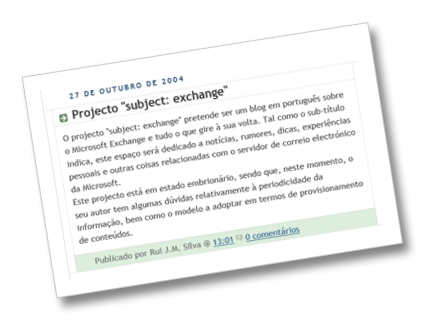
Foi o meu primeiro post neste blog, na altura ainda sem um rumo certo, mas a certeza do tema: Microsoft Exchange Server.
Muita coisa se passou desde então, tanto a nível pessoal, como profissional (ai que saudades de ser MVP!). Mas algo se mantém ao longo destes anos todos: o prazer de escrever sobre Exchange e o gosto de colaborar nas comunidades técnicas.
Parabéns para mim e para todos os que seguem este blog.
25 de outubro de 2013
Leitura de fim-de-semana
- Announcing the Microsoft Solutions Advisory Board
- Supporting Windows Mail 8.1 in your organization
- Do you have a sleepy NIC?
- Directory Based Edge Blocking for Exchange Online Protection
- Hot off the press! Synchronization and Notifications in Exchange Online and Exchange 2013
- Office Configuration Analyzer Tool (OffCAT)
- Windows Azure e Office365 – Validating the synchronization process
- Windows Azure and Office365 – Configuring the synchronization tool
- Cloud Services you can trust: Security, Compliance and Privacy in Office 365
- The Garage Series: Explaining data security and your control in Office 365
- Ignite Webcast - Office 365 Deployment with FastTrack
- Exporting the Suggested Contacts, OWA Auto-complete Cache and Recipient Cache in Exchange 2013 with EWS and PowerShell
- Office 365 OnRamp Autochecks
- Planning and migrating a small organization from Exchange 2007 to 2013 (Part 10)
- Automating Multi-Tenancy in Exchange Server 2010 SP2 (Part 4)
- Where is my Outlook pst-file located?
- Junk E-mail Filter settings for multiple accounts
- Import meetings from a CSV or XLSX file
- Change Appointments macro
- "Folder sharing is not available…" error
- Exchange 2010 and Active Directory Operation Failed on DC Errors
- Why the upper version always wins in mailbox moves
- The influence Managed Availability has over DAGs that you might not realize
18 de outubro de 2013
Leitura de fim-de-semana
- 5 new and improved tools for Exchange and Office 365
- Is that a failed Outlook security update in your pocket or are you pleased to phish me?
- Why I don't think on-premises Exchange is dead
- Using PowerShell reporting to maximize Exchange's potential
- Getting to know your compliance options in Exchange 2013
- Publishing Exchange to the Internet via Web Application Proxy and ADFS
- Configure AutoReseed automatically to reseed failed databases
- Outlook 2013 Hotfix for October 2013 brings back Appointments for upcoming days in To-Do Bar
- Ignite Webcast - Exchange Virtualization
- Slow Mailbox (Migration) Throughput and HP NIC Drivers
- Get-MailboxReport.ps1 v1.02 Released
- Easily compare Office 365 features across different plans
- Part 4: IIS ARR as a Reverse Proxy and Load balancing solution for O365 Exchange Online in a Hybrid Configuration
- Premium OWA with Windows 8.1 Internet Explorer 11
- Office 365: New recommendation for URLs and IP addresses
- Disk Performance Testing with JetStress 2013
- Exchange 2013 DAG with Dynamic Quorum (Part 1)
- Outlook Error: “Not Implemented.”
- Contacts are missing from the Address Book after importing or restoring a pst-file
- Exchange Online Archiving (EOA): a view from the trenches – part 1
- Recovering a Mailbox Database after Accidental Deletion from Active Directory
- Making use of the data logged by Exchange
12 de outubro de 2013
Feature Integration Across Microsoft Office Products v1.2
O documento Feature Integration Across Microsoft Office Products v1.2 foi recentemente disponibilizado para download.

Brief Description
Illustrations for cross-server features: This multi-tab file includes descriptions and architecture illustrations for features that work across Microsoft Office server products. (Exchange Server, Lync Server, SharePoint Server)
Overview
This multi-tab file includes descriptions and architecture illustrations for features that work across Microsoft Office server products, including server-to-server authentication, high-resolution user photos, unified contact store, site mailboxes, Exchange task synchronization, Lync presence in Outlook, and voicemail.
Exchange Load Generator 2013 v15.0.805.0
A ferramenta Exchange Load Generator 2013 v15.0.805.0 está disponível para download.
Brief Description
Exchange Load Generator is a simulation tool to measure the impact of MAPI, OWA, ActiveSync, IMAP, POP and SMTP clients on Exchange servers.
Overview
Use Microsoft Exchange Load Generator 2013 (LoadGen) as a simulation tool to measure the impact of MAPI, OWA, ActiveSync, IMAP, POP and SMTP clients on Exchange 2013 servers. LoadGen allows you to test how a server running Exchange 2013 responds to e-mail loads. To simulate the delivery of these messaging requests, you run LoadGen tests on client computers. These tests send multiple messaging requests to the Exchange server, thereby causing a mail load. LoadGen is a useful tool for administrators who are sizing servers and validating a deployment plan. Specifically, LoadGen helps you determine if each of your servers can handle the load to which they are intended to carry. Another use for LoadGen is to help validate the overall solution.
This version is intended for Microsoft Exchange 2013 Servers only.
Important! LoadGen should be used only in laboratories that have no connection to the production environment. This tool should not be used in any way in a production environment or an environment that is mission critical or contains important information of any kind anywhere in the network.
The tool is provided as-is. At this time, there are no updates or patches planned for future release. No formal support is provided for the tool. Some minimal support may be provided by Microsoft but not all reported issues will be able to be addressed or resolved.
Leitura de fim-de-semana
- Using PowerShell reporting to maximize Exchange's potential
- NFS and Exchange - not a good combination
- Microsoft Exchange tools every IT admin will love
- Publishing Exchange to the Internet via Web Application Proxy and ADFS
- Ignite Webcast - Managed Availability
- Server-side search and more: Updates to Outlook.com Android app
- Managing DAG: Configuring Network Adapters
- Managing DAG: Creating a new DAG using EAC
- Managing DAG: Adding nodes and DAC mode
- Managing DAG in Exchange Server 2013 – The Series
- How to Configure a Relay Connector in Exchange Server 2013
- Why Bother Running DAG Server Maintenance Mode Scripts?
- Analyzing Exchange Transaction Log Generation Statistics
- Parsing out URL's in the body of a Message with EWS and Powershell
- Update on the "hijacking Office 365 via cookie reuse flaw"
- Exchange Connections 2013 wrap-up
- Skills for new people coming into a Windows infrastructure shop
- Communicator and Contact availability status in Outlook 2013
- Getting rid of empty Contact pictures
- Automating Multi-Tenancy in Exchange Server 2010 SP2 (Part 3)
- Configuring an Exchange 2013 Hybrid Deployment and Migrating to Office 365 (Exchange Online) (Part 11)
- A universal group cannot have a local group as a member.
9 de outubro de 2013
SharePoint Server, Exchange, Lync, Office Web Apps: The Mobile Landscape
A Microsoft disponibilizou recentemente um poster muito interessante que se foca no panoramana actual das apps móveis e na experiência de utilização via browser, na vertente dos servidores Exchange, Lync e SharePoint.
Overview
This poster shows a detailed layout of the app and mobile browser-based landscape for SharePoint Server, Lync, Exchange, and Office Web Apps. It covers on-premises and cloud-based network topologies for phones and tablets. For Device Management and Security, System Center Configuration Manager and Windows Intune provide more comprehensive and granular management capabilities across multiple device types.
Actualização do filtro Junk Email do Outlook – Outubro 2013
Está disponível uma nova actualização para o filtro Junk E-mail do Outlook 2003/2007/2010/2013.
"Esta atualização fornece ao Filtro de Correio Eletrónico Publicitário Não Solicitado do Microsoft Office Outlook uma definição mais atual das mensagens de correio eletrónico que deverão ser consideradas correio eletrónico publicitário não solicitado."
O download está disponível para as versões Outlook 2003, Outlook 2007, Outlook 2010 (32-bit, 64-bit) e Outlook 2013 (32-bit, 64-bit) ou através do Microsoft Update. Como é habitual, está acompanhado pelo respectivo artigo da Knowledge Base:
4 de outubro de 2013
Leitura de fim-de-semana
- The Garage Series: 365 Days Later - Office 365 vs. Office 2013 on the Desktop Review
- Troubleshoot Exchange Admin Center access issues in Exchange 2013
- Identifying and fixing disjoint namespace issues in Exchange Server
- Tailor Exchange Deployment Assistant for a successful server install
- Standardize Contacts’ Full Name and File As format
- Delivering the best email experience for tablets with Windows 8.1
- Ignite Webcast - Exchange Architecture
- Ignite Webcast - Microsoft Forefront Online Protection (FOPE) to Exchange Online Protection (EOP) Transition Walkthrough
- Password Hash Synchronization in Office 365
- Tip o’ the Week #189 – Outlook View Tips
- Managing DAG: Configuring a DAG Witness Server
- Managing DAG: Modifying a DAG Witness Server
- Managing DAG: Creating a DAG object
- Beta of Microsoft Office 365 Best Practices Analyzer for Exchange Server 2013 now available
- Released: The new Exchange Server Deployment Assistant
- Exchange 2010, An Active Manager operation failed, content index catalog files in the following state: 'Failed'.
- Planning and migrating a small organization from Exchange 2007 to 2013 (Part 9)
- Internet Explorer 11 only loads OWA Light
- How to Determine Which Receive Connectors are External Relay Connectors
- Many folders created named: "the file so that changes to the file will be reflected in your item."
- IIS Application Request Routing (Part 4)
- Exchange Unwashed Blog Digest September 2013
- Highlights from Day 2 of the Exchange Connections Conference
- Hot points from Exchange Connections
- Release of Apple iPhone 5s and iOS 7 gives new headaches to Exchange administrators
- Exchange 2010 Monitoring: Client Access (Part 1, Connectivity)
- Under The Hood: Exchange ActiveSync Mailbox Log Analysis
- Configuring constrained delegation to authenticate live migrations
- ActiveSync mailbox policies vs. Windows Intune: What's better for MDM?
3 de outubro de 2013
Information Protection and Control with Microsoft Cloud Services
A Microsoft disponibilizou recentemente um conjunto de documentos técnicos sobre Information Protection and Control (IPC) in Office 365 and Exchange Online, utilizando Rights Management Services (RMS).
- Microsoft Rights Management service (RMS) whitepapers
The NEW Microsoft Rights Management service (RMs) offering (microsoft.com/rms) provides the capability to create and consume protected content such as e-mail and documents of any type. Such a capability is available as a standalone subscription (for your on-premises infrastructure with the Microsoft Rights Management connector) or is part of the Office 365 Enterprise subscription, natively integrated with Exchange Online, SharePoint Online, and Microsoft Office to apply persistent protection to the content to meet the business requirements of your organization.
The Microsoft Rights Management suite is implemented as a Windows Azure service. Beyond the available RMS enlightened applications on the market, it comprises a set of Microsoft Rights Management sharing applications that work on all your common devices, a set of software development kits, and related tooling. By leveraging Windows Azure Active Directory, the cloud-hosted Microsoft Rights Management service acts as a trusted hub for secure collaboration where an organization can easily share information securely with other organizations without additional setup or configuration. The other organization(s) may be existing Microsoft Rights Management service’s customers but if not, they can use a free Microsoft Rights Management for individuals capability.
The whitepapers available as part of this download covers the various aspects of the offerings and provide in-depth information to evaluate or use the Microsoft Rights Management service and its components. For an overview of the NEW Microsoft Rights Management service offerings, see the whitepaper NEW Microsoft Rights Management service. - Information Protection and Control (IPC) in Office 365 with Microsoft Rights Management service (RMS) whitepaper
This document is intended to help you previewing and evaluating the Microsoft Rights Management service. For that purpose it contains, as an introduction, a brief information on IPC and the Microsoft Rights Management service that helps you understand what it is, and how it differs from on-premises Active Directory Rights Management Services (AD RMS). It provides step-by-step information on how to configure and use the Microsoft Rights Management service to perform rights protection on your corporate content, as well as other details and requirements you would need to successfully evaluate the Microsoft Rights Management service in your environment.
This document is intended for system architects and IT professionals who are interested in understanding the basics of the Microsoft Rights Management service.
This paper is part of a document series on the identity and security features of Office 365. It indeed completes an initial whitepaper on IPC entitled Information Protection and Control (IPC) in Microsoft Exchange Online with AD RMS also available on the Microsoft Download Center. This first paper describes the cross-premises support for AD RMS on-premises with the Exchange Online services of the previous version of Microsoft Office 365. - Information Protection and Control (IPC) in Microsoft Exchange Online with AD RMS whitepaper
Built on existing Microsoft documentation and knowledge base articles, this paper presents how to leverage the corporate on-premise AD RMS infrastructure in the organization’s Office 365 tenant, and more especially with Microsoft Exchange Online.
This document is intended for system architects and IT professionals who are interested in understanding the basics of cross-premise support for AD RMS on-premise and Exchange Online along with planning and deploying such a deployment model in their environment. It also provides basic instructions for setting up and configuring an AD RMS single-node cluster in a test lab environment for the cross-premise deployment with Exchange Online.
This paper is part of a series of documents on the identity and security features of Office 365, and more especially is the second guide of the series. It indeed completes a first whitepaper entitled Microsoft Office 365 Single Sign-On (SSO) with AD FS 2.0 also available on the Microsoft Download Center. This first whitepaper of the series is intended to provide a better understanding of the different single sign-on deployment options for the services in Office 365, how to enable single sign-on using corporate Active Directory credentials and AD FS 2.0 to the services in Office 365, and the different configuration elements to be aware of for such deployment.
29 de setembro de 2013
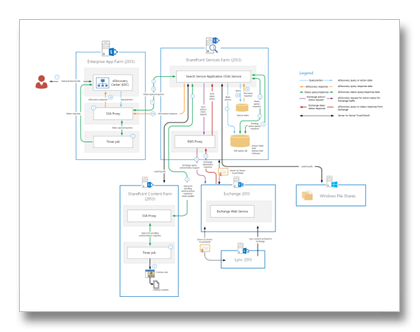
eDiscovery Flow Across SharePoint, Exchange, Lync, and File Shares v1.2
A Microsoft fez pequenas actualizações nos diagramas que ilustram eDiscovery Flow Across SharePoint, Exchange, Lync, and File Shares.
Calendar Checking Tool for Outlook v2.2
A Microsoft actualizou recentemente a ferramenta Calendar Checking Tool for Outlook para a versão 2.2.
Brief Description
The Calendar Checking Tool for Outlook (CalCheck) is a program that checks the Microsoft Outlook Calendar and items for problems or for potential problems.
Overview
The Calendar Checking Tool for Outlook is a command-line program that checks Outlook Calendars for problems. To use this tool, the Outlook calendar must reside on a Microsoft Exchange Server. The tool does not work with IMAP, with POP3, or with other non-Exchange mail servers.
The tool opens an Outlook profile, opens the Outlook Calendar, and then checks several things such as permissions, free/busy publishing, and auto booking. Then, the tool checks each item in the calendar folder for problems that can cause items to seem to be missing or that might otherwise cause problems in the Calendar.
27 de setembro de 2013
Leitura de fim-de-semana
- Outlook Has E-Mail Junk Problem on Exchange 2013
- Exchange Not Yet Supported on Windows Server 2012 R2
- Core Solutions of Microsoft Exchange Server 2013 Jump Start Live October 8
- Troubleshoot Exchange Admin Center access issues in Exchange 2013
- Outlook Categories, Flags, and IMAP Accounts
- Restore a pst-file after configuring a POP3 account via Auto Account Setup
- Outlook Web App for Office 365 Home Premium
- Configuring an Exchange 2013 Hybrid Deployment and Migrating to Office 365 (Exchange Online) (Part 10)
- Automating Multi-Tenancy in Exchange Server 2010 SP2 (Part 2)
- Office 365: Changing the User Principal Name (UPN) on Users in Bulk using a GUI tool
- Junk Email SCL report using EWS and Powershell
- How to Grant Read-Only Access to an Exchange Mailbox
- Blocking iOS7 from Exchange Server 2010/2013
- Avoiding Server Names in SSL Certificates for Exchange Server 2013
- Deploying Exchange Server 2013
- Server Component States in Exchange 2013
- MEC 2014 Registration Opens October 1
- Exchange 2010: Remove-databaseavailabilitygroupserver–configurationOnly does not evict the member from the cluster
- RPC Filtering and Exchange 2010 Database Availability Groups
- Exchange 2013: OutlookMailboxDeeptTestProbe fails with Access Denied
- When Best Practice goes bad
- Fun all round with the UC Architects at Exchange Connections
- Export Email Messages from OWA in Office 365 Exchange Online
- Outlook junk email filtering issue with Exchange Server 2013 and Office 365